Enrolment
The MAX API allows 3rd-party systems to obtain live state updates for EGMs in the venue and to perform certain actions on EGMs in the venue via STOMP connections. In order for the 3rd-party applications to be granted appropriate access to the API services they must first have successfully enrolled. Secure authentication methods are used by the MAXsys MID (a.k.a site controller or PCMID) to identify connected equipment and applications. The authenticated client’s access to specific functionality is then determined based on that client’s authorisation.
API Access and Interaction Model
Transport Protocol
MAX API operates over HTTP(S) and TCP / TLS. The MAXsys MID is the HTTP server, with API Client connecting as HTTPS clients. HTTPS 1.1 is supported and should be used. Secure communications between MAX API and 3rd-party applications are further met by using TLS, X.509 v3 certificates, asymmetric and symmetric cryptography, authentication algorithms (hash functions), and certificate management.
Authentication and Security
The MAXsys MID uses a MAX issued server certificate. The API Client must install/use a MAX root certificate in order to authenticate the MAXsys MID. The API Client must also be issued a client certificate by MAX and use this certificate in order to be authenticated by the MAXsys MID. The authenticated client is then able to be authorised to use MAX API resource access methods.
Clients must be configured to trust a server based only on possession of an unexpired certificate, not based on certificate domain name to DNS matching, as it is not expected that the MAXsys MID will be able to be resolved by the API Client DNS. Depending on the HTTPS client used, it may be necessary to install the individual MAXsys MID certificate as explicitly trusted by the API Client to achieve this result.
Venue Operated Network (VLAN 599)
Third Party Systems access the MAXsys MID via the Venue Operated Network. The Venue Operated Network is configured on the CMS Router and provides a layer 2 path between the MAXsys MID and the venue network. It is required of the Venue/3rd-party to determine how to bridge from the provided secured access port on the CMS Router to the venue LAN.
Venue Operated Network details:
- The Venue Operated Network is 172.16.39.97/29.
- The MAXsys MID HTTP server IP address (MAX_MID_SERVER_IP) is 172.16.39.97.
- API Clients can connect to the MAXsys MID on the network using a static IP address in the range 172.16.39.98 -> 172.16.39.102_, with a subnet mask: _255.255.255.248.
Ports and URLs
In order to use the MAX API there are several endpoints that Third Party applications will need to use:
- The Enrolment endpoint allows the application to obtain Server and Client security certificates, and request client Roles - to obtain Capabilities
- MAX API STOMP interface allows the application to monitor and interact with connected EGMs
- The Schema Registry endpoint allows the application to dynamically obtain the definitions of the messages.
Endpoints
| Purpose | Access Method | Security Method | URLs |
|---|---|---|---|
| Swagger/OpenAPI Contract (Disabled) | HTTP(s) GET | /api-docs, Secured & unsecured | http(s)://<MAX_MID_SERVER_IP>:10098/api-docs |
| Establish Trust (Disabled) | HTTP(s) GET | /MAXAPI/venue-api-root-cert, Secured & unsecured | http(s)://<MAX_MID_SERVER_IP>:10098/MAXAPI/venue-api-root-cert |
| Enrolment | ReST HTTP(s) | /enrol, Secured & unsecured | http(s)://<MAX_MID_SERVER_IP>:10098/enrol |
| Enrolment | ReST HTTPS | /roles, Authorised via Server issued Client Certificate | https://<MAX_MID_SERVER_IP>:10098/roles |
| Advanced VDA | STOMP with TLS | Authorised via Server issued Client Certificate and appropriate Permissions | tcp://<MAX_MID_SERVER_IP>:61614 |
| Schema Registry | ReST HTTP | Unsecured | http://<MAX_MID_SERVER_IP>:9400 |
NOTE:
The Swagger/OpenAPI Contract is no longer available from the MAXsys MID but has been published on this website. (See the MAX API Contract section below.)
MAX API REST Services used for Enrolment Process
NOTE:
The Root CA can no longer be retrieved from the /MAXAPI/venue-api-root-cert endpoint. (See Code Samples below for alternative)
| Service | Description | Possible HTTP Status Code |
|---|---|---|
| GET /MAXAPI/venue-api-root-cert (Disabled) | The purpose of visiting this endpoint is to retrieve the Root CA of this server's certificate. This is provided so that the client can store the Root CA certificate in it's trusted key store. | Status: 200 = OK. Server's Root CA certificate in PEM format. |
| When making a request, the client should not verify the server's certificate against a list of certificate authorities (CAs). | ||
| GET /enrol | The purpose of visiting this endpoint is to make an initial request to allow the client and server to handshake, so that the client can use the previously retrieved CA to verify the Server's certificate. | Status: 204 = No Content |
| POST /enrol | Upload CSR (certificate signing request). The purpose of visiting this endpoint is to allow the client to upload a certificate signing request (CSR) and for the server to return a signed certificate to allow secure communication. | Status: 201 = Enrolment successful. Certificate Returned |
| Status: 400 = Invalid CSR | ||
| Status: 406 = Certificate type is not acceptable | ||
| GET /roles | The purpose of visiting this endpoint is to allow the client to find out the status as to whether or not the requested roles have been granted or not. | Status: 200 = OK. |
| POST /roles | The purpose of visiting this endpoint is to allow the client to request roles that will provide appropriate permission for the third party application type. | Status: 201 = OK. |
| Status: 400 = Bad request | ||
MAX API Contract
The Swagger / OpenAPI contract is available from the MAX API from the /api-docs endpoint (http://<MAX_MID_SERVER_IP>:10098/api-docs). The contract can be retrieved in either JSON (default) or YAML format depending on the 'Accept' header mime-type. And as either the OpenAPI-3.0 (default), or Swagger-2.0 specification format by providing a 'format' query parameter, eg using curl:
curl http://<MAX_MID_SERVER_IP>:10098/api-docs?format=swagger -H "Accept: application/yaml"NOTE:
The Swagger/OpenAPI Contract is no longer available from the MAXsys MID but has been published on this website instead. See links below.
OpenAPI
Enrolment OpenAPI Contract (YAML) Enrolment OpenAPI Contract (JSON)
Swagger
Enrolment Swagger Contract (YAML) Enrolment Swagger Contract (JSON)
MAX API Sequence Diagram
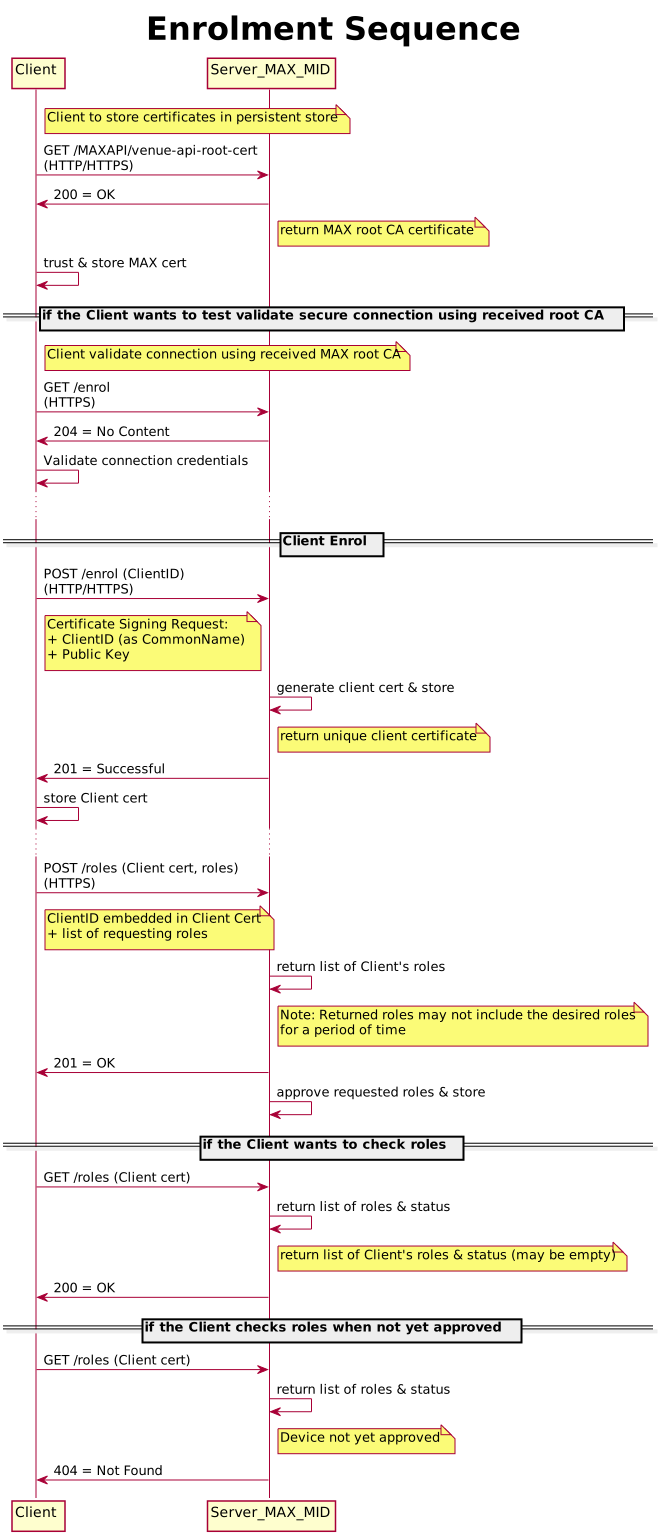
X.509 Certificate
An X.509 certificate contains:
- Name of the owner
- Public key of the owner
- Serial number
- Name of the issuer
- Expiry date.
These entries are digitally signed by MAX
Because the certificate is signed, its contents cannot be changed (the public key cannot be exchanged).
Any response that does not indicate success may include more detailed error information in the response body. The error response body schema is:
APIError:

  type: object

  required:
    - status
    - title
    - detail

  properties:
    status:
      type: string
      description: HTTP status text description

    title:
      type: string
      description: Quick description of the error

    detail:
      type: string
      description: More detail on the error
The error response body is informational only. API Client should not depend on/use the error response beyond displaying or logging it for diagnostic purposes.
Schema Registry
The MAX API allows Third Party Systems to obtain schema definitions via the schema API. Third Party applications need valid MAX API schemas in order to decode the Avro messages (sent from MAXsys), that they have Subscribed to and to Publish valid messages. This specification portal provides a snapshot of the current schema definitions that apply to the MAX API. MAXsys also provides a dynamic mechanism of obtaining current schema at run-time. Messages received from MAXsys contain a unique Avro schema MD5 fingerprint. The REST schema API has a GET /schema/{fingerprint} operation that returns the corresponding schema as a string.
| Service | Description | Possible HTTP Status Code |
|---|---|---|
| GET /schema/{fingerprint} | The purpose of visiting this endpoint is to obtain the schema that matches the received fingerprint, and so be able to decode the received message. | |
| Required input argument | fingerprint, of type string. | |
| Response | {"reference": string, "schemaData": string} | 200. |
| GET /schema/search/{fullname} | The purpose of visiting this endpoint is to obtain all versions of the named schema and their fingerprints. A client may use this service to avoid calculating the fingerprint to send a message. | |
| Required input argument | fingerprint, of type string. | |
| Response | [ {"reference": string, "schemaData": string} ] | 200. |
| The schema was not found | 404 |
Swagger Contract for Schema Registry
swagger: "2.0"
info:
  version: "0.7.0"
  title: MaxSys Schema Registry Service
basePath: /
schemes:
  - http
  - https
consumes:
  - application/json
produces:
  - application/json
paths:
  /schema/:
    x-swagger-router-controller: schema
    put:
      summary: Write a schema revision
      operationId: writeSchema
      description: Write an event schema.
      tags:
        - schema
      parameters:
        - name: schemaDefinition
          description: Avro schema definition (as string)
          in: body
          required: true
          schema:
            $ref: "#/definitions/SchemaDefinition"
      responses:
        "200":
          x-gulp-swagger-codegen-outcome: accepted
          description: The schema update was accepted. The returned value is the schema reference.
          schema:
            $ref: "#/definitions/SchemaAccepted"
        "400":
          x-gulp-swagger-codegen-outcome: badName
          description: The schema name does not meet the naming rules for the service.
        "403":
          x-gulp-swagger-codegen-outcome: localUpdateOnly
          description: Only allow to PUT/POST schema to the registry from localhost.
          schema:
            $ref: "#/definitions/SchemaAccessError"
        "409":
          x-gulp-swagger-codegen-outcome: conflict
          description: The schema version could not be accepted, as the version was not semantically compatible with the existing revisions.
          schema:
            $ref: "#/definitions/SchemaRevisionConflict"
        "500":
          x-gulp-swagger-codegen-outcome: error
          description: The schema version could not be accepted, due to an internal error.
          schema:
            $ref: "#/definitions/SchemaOperationError"

  /schema/search/{fullName}:
    x-swagger-router-controller: schema
    get:
      summary: Find schemas by a specified full-name.
      operationId: getSchemasByName
      description: Returns a collection of schemas.
      tags:
        - schema
      parameters:
        - name: fullName
          description: Full name of Avro schema, including namespacing and version.
          in: path
          required: true
          type: string
      responses:
        "200":
          x-gulp-swagger-codegen-outcome: matches
          description: Schemas matching this full name
          schema:
            $ref: "#/definitions/SchemaCollectionResult"
        "400":
          x-gulp-swagger-codegen-outcome: badName
          description: The schema name does not meet the naming rules for the service.
        "500":
          x-gulp-swagger-codegen-outcome: error
          description: The schema version could not be accepted, due to an internal error.
          schema:
            $ref: "#/definitions/SchemaOperationError"

  /schema/{fingerprint}:
    x-swagger-router-controller: schema
    get:
      summary: Get a schema by it's full name
      operationId: getSchemaByRef
      description: Get an event schema.
      tags:
        - schema
      parameters:
        - name: fingerprint
          description: Avro fingerprint.
          in: path
          required: true
          type: string
      responses:
        "200":
          x-gulp-swagger-codegen-outcome: schemaFound
          description: The schema was found. The body contains the schema as a string.
          schema:
            $ref: "#/definitions/SchemaSingleResult"
        "404":
          x-gulp-swagger-codegen-outcome: notFound
          description: The schema was not found.
        "500":
          x-gulp-swagger-codegen-outcome: error
          description: The schema version could not be accepted, due to an internal error.
          schema:
            $ref: "#/definitions/SchemaOperationError"

# complex objects have schema definitions
definitions:
  SchemaAccepted:
    description: The schema update was accepted. This message contains the schema reference for lookups.
    type: string

  SchemaRevisionConflict:
    description: |
      The schema revision was not accepted. The fields of this message contain further information
      to help diagnose why.
    type: object
    required:
      - reason
    properties:
      reason:
        description: |
          Type of conflict that was identified: Major means a field was removed or modified such that the structure is not backward
          compatible. Minor means a new field was added. Patch versions can be used to modify documentation only.
        type: string
        enum:
          - INVALID_CHAIN
          - ALREADY_EXISTS
      message:
        type: string
  SchemaAccessError:
    description: An error has occurred during the schema operation.
    required:
      - message
    properties:
      message:
        description: Error message text
        type: string
  SchemaOperationError:
    description: An error has occurred during the schema operation.
    required:
      - errorId
      - message
    properties:
      errorId:
        description: Unique error ID
        type: string
      message:
        description: Error message text
        type: string
      stack:
        description: Stack trace (Only shown in Dev Mode)
        type: string

  SchemaDefinition:
    description: |
      An Apache Avro Schema definition to be stored in the registry.
    type: string


  SchemaCollectionResult:
    description: A collection of multiple schemas that have the same name.
    type: array
    items:
      $ref: "#/definitions/SchemaSingleResult"

  SchemaSingleResult:
    description: |
      An Apache Avro Schema definition stored in the registry.
    type: object
    properties:
      reference:
        description: Avro schema fingerprint.
        type: string
      schemaData:
        description: Schema as string
        type: string
Code Samples
From the 3rd-party host machine connected to the MAX API server from the Venue Operated Network (VLAN 599)...
Enroll the MAX API client - OpenSSL
Get the MAX API server root certificate (file output -> max_api_server.crt):
echo "GET /enrol" | openssl s_client -connect 172.16.39.97:10098 -showcerts 2>/dev/null | sed -ne '/BEGIN CERT/,/END CERT/p' > max_api_server.crt
Look at the details of the server certificate (optional):
openssl x509 -noout -text -in max_api_server.crt
Test the server certificate verifies:
# Initially without server cert to verify failure due to 'Peer's certificate issuer has been marked as not trusted by the user':
curl -v https://172.16.39.97:10098/enrol
# Now with the server cert, but will still complain about domain name: 'Unable to communicate securely with peer: requested domain name does not match the server's certificate':
curl -v https://172.16.39.97:10098/enrol --cacert max_api_server.crt
Create a client private key & certificate-signing-request to be used by the 3rd-party MAX API client (file output -> map_api_client.key, map_api_client.csr):
openssl req -nodes -newkey rsa:2048 -keyout max_api_client.key -out max_api_client.csr -subj "/C=AU/ST=QLD/L=Sydney/O=SomeOrg/OU=SomeOu/CN=max_api_client1"
Enrol over the secure channel (file output -> max_api_client.crt):
curl -v -k -X POST -H "Content-Type: application/pkcs10" -H "Accept: application/x-pem-file" --data-binary @max_api_client.csr https://172.16.39.97:10098/enrol -o max_api_client.crt
Get roles with enrolled certificate - should result in "Not Found" as max api client enrolment is not implemented at the CMS host yet:
curl -v -k https://172.16.39.97:10098/roles --cert ./max_api_client.crt --key ./max_api_client.key | jq
At this point you now have a key and signed cert for your MAX API Client to use to connect to the MAX API server on 172.16.39.97:61614MAX API Client example
Using the Stomp.py command-line client (might need to install one), subscribe to all AVDA messages:
stomp -L "X/**" --ssl --ssl-key-file ./max_api_client.key --ssl-cert-file ./max_api_client.crt -P 61614
message-id: 00000000-64a7-ad77-0005-ffdf9049aa08
subscription: 1
xnsw-1000010
89414
����N�gZX/JackpotLink.89414.JackpotLinkCurrentAmounts"�H���
.
.
.
^C
NOTE: The messages returned by the stomp client are binary encoded AVRO and must still be deserialized. Refer to the apidocs for more details.
NOTE: Messages are live, the stomp client example will only see updated messages, not current state and then live updates. To see the current state,
you must set the stomp header "eager" to true in your own stomp client (the stomp.py cli does not allow us to set custom headers). Refer to the apidocs for more details.GET Enrol (Root CA) - Javascript
;
const https = require('https');
// MAXsys MID HTTP server IP address
const apiEndpointIP = '172.16.39.97';
const req = https.request({
method: 'GET',
hostname: apiEndpointIP,
port: 10098,
path: '/enrol',
rejectUnauthorized: false,
}, res => {
const serverCert = res.socket.getPeerCertificate().raw.toString('base64');
if (!serverCert) throw new Error('No server cert');
console.log(serverCert); // save this cert and store in your key chain
});
req.on('error', err => {
console.error(err);
});
req.end();